Overview
Just Scan with Your Smartphone or Tablet to Access Product Information Directly
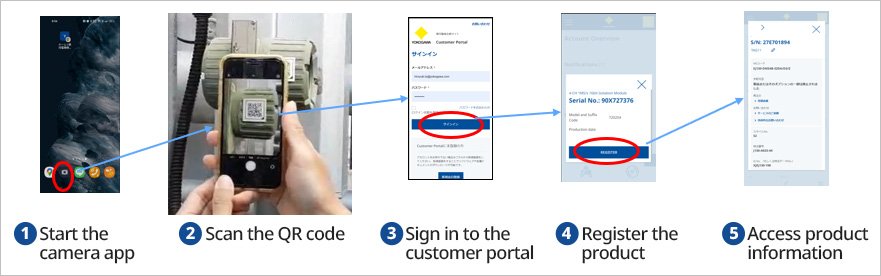
By scanning the QR code attached to Yokogawa products with a smartphone or tablet, you can obtain detailed product information and related documents on the spot. No special app is required—simply use your device's camera. This provides instant access to information useful at maintenance sites. Moreover, these QR codes comply with the international standard IEC 61406 for outstanding reliability. The destination opens on our member site (Customer Portal).
Key Features
- Easy scanning: Works with the standard camera on smartphones and tablets. No special app required.
- Rich information: Immediately obtain serial numbers, specifications, manuals, certificates, and more.
Available items include product serial number, device specifications, user manuals, calibration certificates, test reports, device setting information, and reorder availability. - IEC 61406 compliant: Meets international standards. Look for the ▲ mark at the bottom right.
Use Cases
- On-site device confirmation, specification checks, and troubleshooting
- Instant retrieval of manuals and certificates during maintenance or inspection
- Model number confirmation and quote requests for parts replacement
- Updating equipment management ledgers and responding to inquiries
Security & Access
- Access destination: Customer Portal
- Secure usage via HTTPS encrypted communication
About the Product QR Codes
To avoid confusion caused by the coexistence of new and old QR codes, here's how to tell them apart. You can distinguish the version by the ▲ mark at the bottom right of the QR code and whether the code is surrounded by a frame.
| New QR Code (since 2024) | Previous QR Code (since 2018) | |
|---|---|---|
| Appearance (example) | 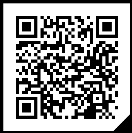 |
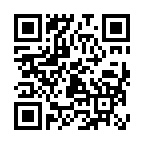 |
| Compliant Standards | IEC61406-1 | None (Yokogawa original) |
| Information Included | URL-formatted string containing the serial number | String representing the serial number |
| How to Use | Scanning QR codes on a smartphone or tablet camera opens Customer Portal product-information page. | After signing in to Customer Portal with a camera-equipped device, you can open the product info page by scanning QR code instead of manually entering the serial number. |
Products with IEC-Compliant QR Codes ※1
| Product Name | Availability |
|---|---|
| PH8EFP/PH8ERP(Option: /CAL) | March 2024 |
| YTA610/YTA710 | June 2024 |
| ROTAMASS | September 2024 |
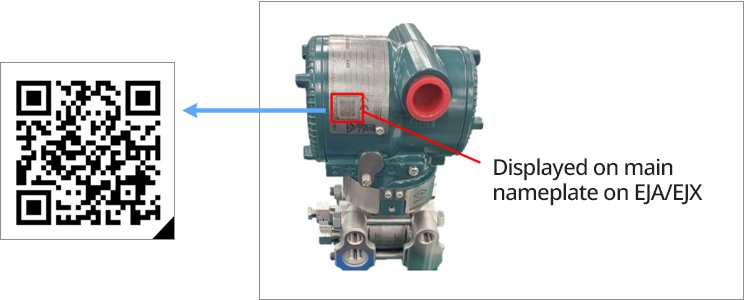
| EJA/EJX | November 2024 |
| Sushi Sensor XS110A※2 | April 2025 |
| AXG/AXW/CA | April 2025 |
| VY | April 2025 |
| Rotameter RAMC | July 2025 |
| Field Wireless (EJXxxx-B series/YTA510/FN110/FN120/FN310/FN510/FN910/YFGW410/YFGW520/YFGW610/LN01/LN90) | September 2025(Planned) |
| Rotameter RAKD | November 2025(Planned) |
| SMARTDAC+(GX10※3/GX20/GP10※3/GP20/GX60/GX90/GM10/GM90PS/GM90MB/GX70SM) | November 2025(Planned) |
| JUXTA VJ※3 | December 2025(Planned) |
| UTAdvanced※3/LL50A※3/YS1000※3/YSS1000※3 | January 2026(Planned) |
| SMARTDAC+(GX10-S11/GP10-S11/GX20-S11/GP20-S11/GM10-S11) | April 2026(Planned) |
※1: The timing of application may vary depending on production conditions.
※2: The size of QR code attached to Sushi Sensor XS770A, XS530, XS550, XS822 is smaller than the size specified by IEC, so it's non-IEC compliant QR. But functionality is equivalent to that of IEC compliant ver.
※3: The size of QR code is smaller than the size specified by IEC, so it's non-IEC compliant QR. But functionality is equivalent to that of IEC compliant ver.
FAQ
| No. | Category | Question&Answer |
|---|---|---|
| 1 | Operation | Question |
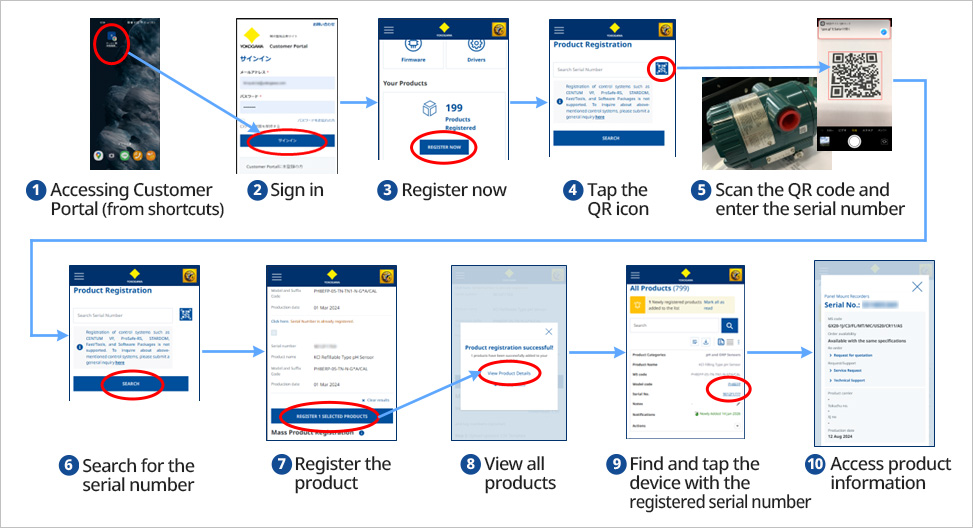
| Please tell me the procedure to register the product with IEC compatible QR code in Customer Portal. | ||
| Answer | ||
|
With QR codes based on IEC 61406-1, you can get product information by scanning the QR code with the camera of smartphone or tablet device without any special application.
|
||
| 2 | Operation | Question |
|
Please tell me how to register product with YOKOGAWA's unique QR code in Customer Portal. |
||
| Answer | ||
|
With YOKOGAWA's unique QR code, you can get product information by scanning the QR code after logging in to our company membership site with a device with camera.
|
||
| 3 | Operation | Question |
| How do I register a product without QR code in Customer Portal? | ||
| Answer | ||
| Products without QR code can be registered by manually entering the serial number on the Customer Portal product registration page. | ||
| 4 | Product Registration | Question |
| What can customer do when he/she registers a product in Customer Portal? | ||
| Answer | ||
| Users can get documents such as Instruction Manual, General specifications, and certificates at the time of shipment of the registered product, and can check the date of manufacture, whether to re-order, and customer specifications. They can also make technical inquiries and request estimates for the product. | ||
| 5 | Authentication | Question |
| Why do I need two-factor authentication? When is it required? | ||
| Answer | ||
| For security purposes, Customer Portal may require two-factor authentication when users sign in. | ||
| 6 | Authentication | Question |
| I did not receive a two-factor authentication email. | ||
| Answer | ||
| Check the mailbox of the email address you registered when you registered as a member of Customer Portal. If it still hasn't arrived, press "Resend authorization code." | ||
| 7 | Error | Question |
| The related documents are not displayed on the information page of the registered product. | ||
| Answer | ||
| Certificates that are not arranged with the product will not be displayed. Instruction Manual, General specifications and Drawing may also appear when you search for the product name in the knowledge base page. If this does not work, please contact us with your serial number. | ||
| 8 | Error | Question |
| Unable to scan QR code. | ||
| Answer | ||
| Possible causes are a dirty QR code or insufficient resolution of the camera. In this case, enter the serial number manually. | ||
| 9 | Information | Question |
| Can I check if the product supports IEC QR code before purchasing? | ||
| Answer | ||
| There is currently no list of target products for each exact type name. Please check this list as a guide. |
“QR Code” is a registered trademark of DENSO WAVE INCORPORATED.
If you have any questions, please contact us through the Customer Portal.
Related Products & Solutions
-
Flowmeters
Yokogawa has a wide range of flow solutions with high quality, accuracy, and reliability. With over 100 years of flowmeter experience, our technologies can provide a solution for virtually all flow applications.
-
Pressure Transmitters
The accurate and stable measurement of process pressure with Yokogawa Pressure Transmitters supports the safe, reliable, and profitable operation of your plant.