Alarm Reporting and Analytics Software for Safer, More Reliable Plant Operations
Exaquantum/ARA helps industrial teams analyze alarm and event data, identify nuisance alarms, monitor alarm KPIs, and improve alarm system performance using reports aligned with ISA-18.2, IEC 62682, and EEMUA 191 practices.
When operators face too many alarms, critical events can be missed or delayed. Exaquantum/ARA gives supervisors, engineers, and plant managers the visibility needed to understand alarm behavior, reduce alarm floods, and make data-driven improvements to alarm management programs.
Details
Alarm Overload Makes It Harder to See What Matters
 Industrial operators must respond quickly when abnormal situations occur. But when alarm systems generate excessive alarms, nuisance alarms, or alarm floods, operators can become overloaded with information. This can slow response times, increase stress, and make it harder to prioritize alarms that require immediate action.
Key Pain Points:
- Too many alarms during abnormal situations
- Nuisance alarms that distract operators
- Alarm floods that obscure root causes
- Limited visibility into alarm system performance
- Difficulty identifying bad actor alarms
- Manual reporting that slows continuous improvement
What Are the Common Industrial Alarms and Reports that Need to Be Managed?
 |
 |
 |
 |
 |
|
Alarm |
Top |
Chattering |
Standing |
Silent & |
 |
 |
 |
 |
 |
|
Operator |
Area |
Alarm Flood |
Alarm Priority |
Custom |
Turn Alarm Data Into Actionable Alarm Management Insights
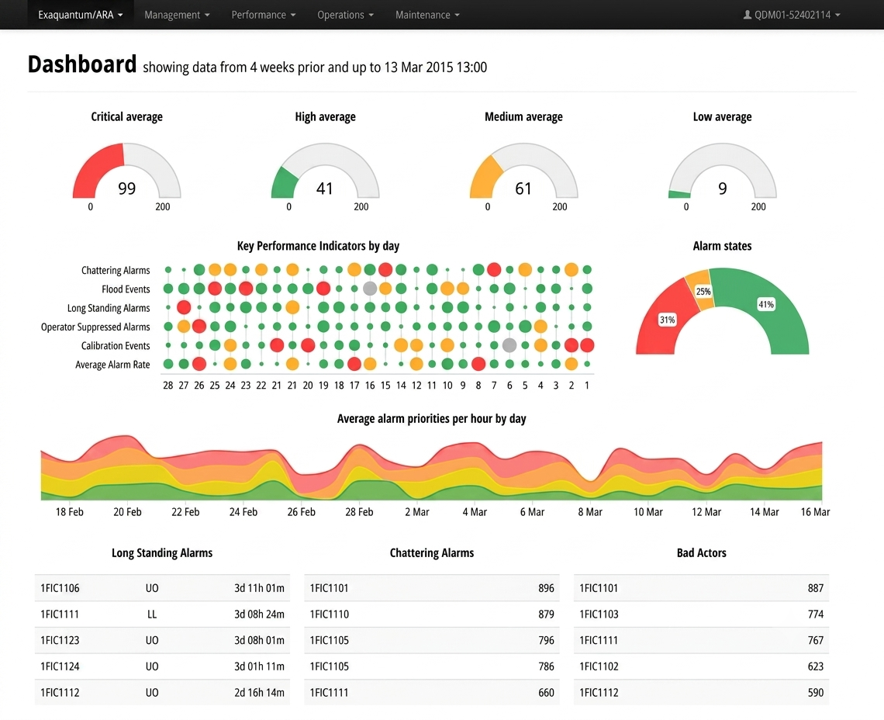
Exaquantum/ARA helps teams move from alarm data to alarm insight. By collecting alarm and event data and presenting it through dashboards, reports, filters, and KPIs, the software helps users identify alarm patterns, investigate problem areas, and support continuous improvement of alarm system performance.
 |
 |
 |
 |
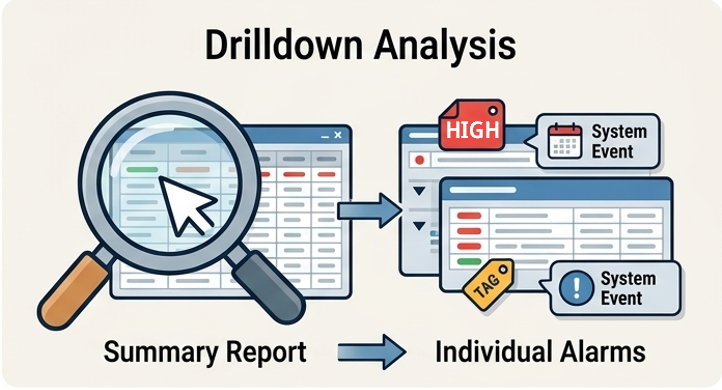
| Monitor alarm system performance using reporting aligned with recognized alarm management practices, including ISA-18.2, IEC 62682, and EEMUA 191. | Move from summary reports to individual alarms and events to investigate patterns, frequent alarms, and areas of concern. | Identify frequent, chattering, standing, suppressed, and other problem alarms that may contribute to operator overload. | Share alarm insights through scheduled reports and exports for faster reviews and decisions. |
Improve Alarm Performance, Operator Focus, and Operational Reliability
Effective alarm reporting helps industrial teams focus on the alarms that matter most. Exaquantum/ARA supports alarm management programs by helping teams evaluate alarm performance, identify opportunities for improvement, and provide stakeholders with timely information.
 |
 |
 |
 |
 |
| Reduce Distracting and Nuisance Alarms |
Improve Operator Response |
Support Plant Safety and Environmental Risk Reduction |
Identify Alarm Improvement Opportunities |
Enable Timely Decision-Making |
| Help operators focus on abnormal situations that require action. | Provide clearer visibility into alarm behavior so teams can respond more effectively. | Use alarm performance insights to support safer and more reliable operations. | Use focused KPIs to identify where alarm policies, configuration, or review need attention. | Give stakeholders access to alarm information through on-demand and scheduled reports. |
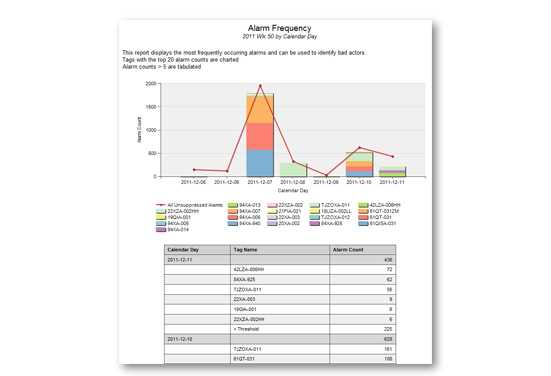
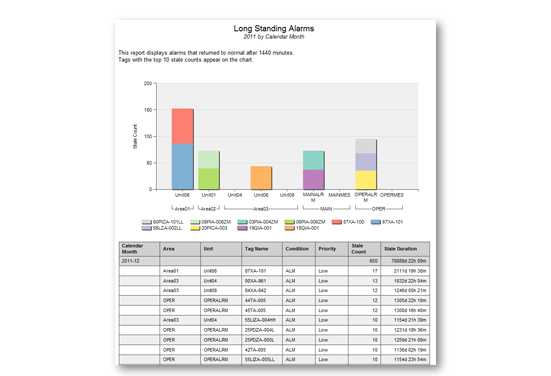
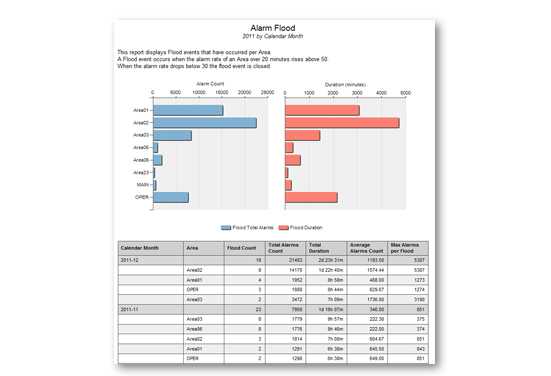
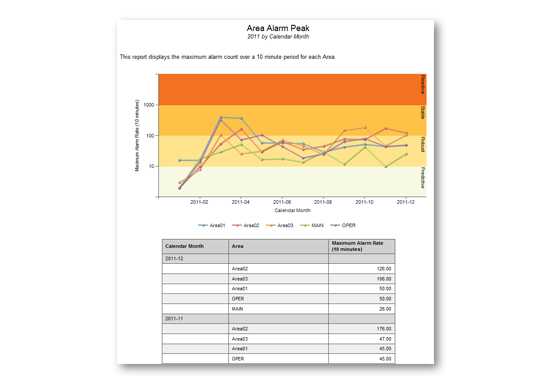
Exaquantum/ARA, hereafter referred to as 'ARA', continuously collects alarm and event data to provide statistical reports based on EEUMA 191 and ANSI/ISA-18.2-2009. These reports aid supervisors and managers in identifying which alarms and events are occurring most frequently and where the alarm management policy can be improved. Each report can be filtered and drilled down to desired levels, including individual alarm occurrences, and then exported to a number of file formats including PDF, Word and Excel.
ARA can be installed on a single server and provides access to multiple users via its intuitive web user interface, eliminating the need for any client software.
In addition to the web user interface, authorized access to the data is provided via Excel and SQL Server Report Builder, allowing custom reports to be created.
Alarm and Event Collection
Alarms and event data is continuously collected via OPC A&E 1.1. For those Yokogawa systems that use Exaopc, Yokogawa has extended Exaopc's OPC HDA server to include Historical Alarms & Events (HAE), which allows Exaopc to automatically buffer all alarms and events if the network connection to Exaquantum PIMS is lost. Once the connection is restored, all buffered Exaopc alarms and events will be available to be processed by ARA.
Interface with Yokogawa's 'CAMS for HIS'
ARA can retrieve the following information from Yokogawa's 'CAMS for HIS':
- Detection Disabled Alarms
This status is used in CAMS to annunciate important alarms and remove low-value alarm messages from DCS alarm displays within an operator station. Reports that are designed to reflect alarm loading from the operator's perspective exclude detection disabled alarms. Reports are provided that display information about the number and frequency of disabled alarms - Alarm Priority Overrides
CAMS provides alternative priority settings to override those present in the DCS. If present, ARA processes new alarms using the CAMS priority; otherwise the DCS alarm level is used - Group Suppressions
CAMS group suppression allows a group of alarms to be suppressed from the operator's perspective. Reports that contain alarm loading from the operator's perspective can be filtered to include or exclude group suppressed alarms - Shelved Alarms
CAMS allows operators to shelve alarms, temporarily removing them from the operator's view, allowing them to concentrate on more important alarms and return to the shelved alarms when convenient. Reports that relate to actions by operators can be filtered to include or exclude shelved alarms
Automatic Plant Hierarchy Creation
If configured in the Process Control System, ARA can extract and store plant hierarchy information contained within received alarm and event messages. This plant hierarchy can then be used to filter information displayed in reports.
Reports Overview
ARA provides 44 reports (described below), grouped into the following four areas:
- Management – providing a high-level overview of plant KPIs
- Performance – covering specific EEMUA 191 performance guidelines to quickly highlight potential areas of concern
- Operations – day-to-day operator reports covering alarm rates and trends
- Maintenance – highlighting problem alarms and aiding in the alarm rationalization process
Report Filters
ARA report filters are used to refine and analyze the report information to expose hidden alarming problems. As the information on the report is already generated, filtering occurs on demand. Depending on the report, the filters may include:
- Time resolution and periods to determine when problems are occurring and the alarming patterns
- Plant area or units to isolate areas of particular concern
- Operator selection to help identify the alarms and events that the selected operator sees most frequently
- Alarm tag and conditions help to identify patterns in a particular alarms behavior, enabling effective corrective action to be taken
- Alarm priority to highlight the priority distribution and discover alarms that may have an inappropriate priority level assigned to them
- Suppression types to view statistics on the number of alarms that have been disabled, group suppressed and shelved
Report Scheduling and Exporting
Microsoft Reporting Services technology is used by ARA to schedule and distribute reports to various file locations and email addresses.
In addition, ARA provides key exporting options for ARA reports, such as:
- PDF – Standard for publishing, storing and distributing reports
- Excel – Allows further analysis and combining of disparate data for reporting
- Word – Creation of weekly/monthly reports that can be annotated and signed off
Web User Interface
Client access to ARA is provided via an intuitive web user interface, eliminating the need for specific client software. A central navigation bar provides links to each of the reports, localization options and other Exaquantum products.
The web user interface is compatible with Microsoft Internet Explorer versions 8, 9 and 10 with security provided through Windows local and domain user groups.
Localization
The ARA user interface can be seamlessly switched between installed languages. ARA is provided with US English by default with support for additional languages on request – please contact a local Yokogawa office for more information.
Exaquantum/ARA Report Branding
Report styles are stored centrally in ARA, allowing style changes to be made easily and consistently across all reports. This ensures that company standards can be adhered to in the production of reports.
Custom Reports
In addition to the reports supplied with ARA, custom reports can be created in:
- Excel – ARA data can be further analyzed and charted with process data from Exaquantum PIMS also incorporated to produce a single report containing both alarm and process data
- SQL Server Report Builder – Created in SQL Report Builder and accessed via the ARA web browser menu of reports, these reports can be scheduled and distributed

Alarm Rationalization using Exaquantum/ARA with Exaquantum/AMD (Alarm Master Database)
Alarm rationalization can be provided by using Exaquantum/ARA with Yokogawa's Master Alarm Database solution 'Exaquantum/AMD'.
Exaquantum/ARA provides a comprehensive set of reports in order to understand the performance of the system and to identify problem areas. Once such problem alarms have been identified, the alarm settings can then be modified using Exaquantum/AMD's comprehensive Management of Change (MOC) environment.
| Service Description | Yokogawa Deliverables |
|---|---|
| Alarm & Event Analysis |
|
| Alarm Philosophy |
|
| Fundamental Nuisance Alarm Reduction |
|
| Alarm System Design (Consultation & Training) |
|
| Alarm System Design (Software & Training) |
|
| State-Based Alarm Management (Consultation & Training) |
|
| State-Based Alarm Management (Software & Training) |
|
| Alarm Monitoring & Improvement (Consultation) |
|
| Alarm Monitoring & Improvement (Software & Training) |
|
Resources
Alarm management is not just a project that has a start and end date; it's a continuous cycle. Once the alarm system has been reviewed and improvements have been identified, we must check that controls are in place to ensure the alarm system remains functional. The key is to ensure that the system is continuously monitored and any changes are fully documented. There are seven key steps for alarm management. Rationalization is one of those critical steps.
Downloads
Brochures
Videos
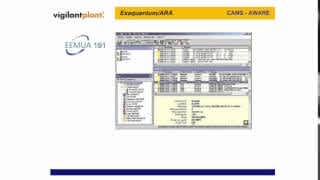
Exaquantum/ARA is a comprehensive set of statistical reports and KPIs based upon ISA 18.2-2009 & EEMUA 191. Alarm and Events can be aggregated by hour, day, shift, week, month, quarter and year providing alarm rates, counts, peaks, floods, etc. Exaquantum/ARA can be used to reduce the number of unwanted and distracting alarms allowing operators to react faster to abnormal situations with the proper corrective action, resulting in a safer and more productive plant, reduced environmental risk, enhanced maintenance response; Reduction in the amount of equipment damage. This package is part of our Alarm Management suite that utilizes software tools, alarm rationalization processes, and alarm philosophy generation as part of the solution aimed at reducing operator stress, operator overload prevention, and providing KPI information to key stakeholders on demand and by emails facilitating efficient and timely decision making.
Exaquantum is a comprehensive Plant Information Management System (PIMS) incorporating a data historian for real time and historical data, alarms, and events along with aggregations, role-based views and KPIs, graphical HMI, trends, reports, and integration with different systems. It provides a cetralized repository for users throughout the plant and is the foundation for most of Yokogawa's production, safety, and alarm optimization solutions and operator effectiveness solutions. Exaquantum can acquire data from all facets of a process and transform that data into easily usable, high-value actionable information that can be made avaialable across the enterprise.

Alarm management is critical to ensuring the smooth running of operations and safer, more reliable plants. However, if alarms are poorly managed, they can compromise plant safety and negatively impact performance and profitability for organizations in the process industry.
Organizations rely upon the proper handling of process alarms to help ensure the smooth running of their operations and to meet industry standards.
Yokogawa provides Exaquantum alarm management solutions to help overcome these challenges. With a comprehensive alarm management solution to store and track alarm data, perform root cause analysis of events, and a master database providing a comprehensive mechanism for management of change. Users can review and assess the alarm system's performance to make necessary changes or rationalize it throughout its lifecycle.
For more information, visit: https://www.yokogawa.com/solutions/products-and-services/information/production-management/alarm-management/
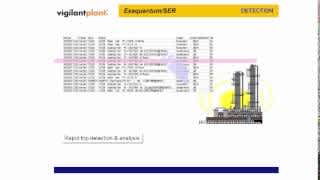
Exaquantum/SER is a unified sequence of events recorder solution that provides a plantwide integrated view of alarms, events and associated process data. It identfies, collects, and processes alarms, events and process data related to plant trips from systems throughout the plant (DCS, historians, PIMS, PLCs, process automataion controllers, SCADA systems, safety systems, etc.) and stores the created information in an open and portable database. It can be used to provide trip detection based upon specific plant conditions and provide a full log of all relevant process information in the crucial period before and after a plant event. Exaquantum/SER's plantwide integrated view can be used for peformance analysis and in aiding investigation teams in performing root cause analysis and problem identification. This solution assists in the elimination or reduction in the number of unexpected incidents and trips while increasing availability and production.
Looking for more information on our people, technology and solutions?
Contact Us